Cut file checker › Answers

What should I check in a DXF before plasma cutting or ordering metal parts?

Updated Nov 11, 2026

Short answer: One-to-one scale with units, closed contours, no duplicates or stray points, text as outlines, no splines, gaps between parts.

Check your file now (free)

What do you cut with?

Drop your SVG or DXF file here

or

Free. Nothing is uploaded: the check runs on your own computer.

The checklist

  1. One-to-one scale, units saved. A DXF without units opens 25.4 times off. DXF wrong size.
  2. Every contour closed. CAM software and metal shops reject open contours. Open contours.
  3. No duplicates or stray points. Doubles cut twice; points make the torch pierce. Stray points.
  4. Text turned into outlines. Active text will not cut. Letters with middles need bridges. Text to outlines.
  5. No splines; R12 if in doubt. Plasma CAM often mishandles splines. Splines and DXF versions.
  6. Parts do not touch. Leave a gap between separate parts; shops reject shared or crossing lines.
  7. Only cut geometry. Remove dimensions, notes and hatching.

Choose "Plasma or metal shop" in the checker above and drop your DXF: it runs every check and fixes most of them in one click.
Real example: before and after

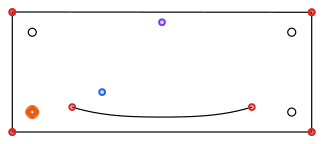
The example file before fixing, with problems marked: 5 open shapes; Doubled lines: 1 shape is drawn twice; 1 piece of text is still typed text: "OPEN"; 1 stray dot
Before, problems marked
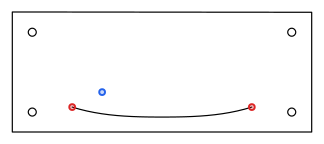
The same file after fixing
After

What the checker found

  • 5 open shapes
  • Doubled lines: 1 shape is drawn twice
  • 1 piece of text is still typed text: "OPEN"
  • 1 stray dot
  • Size: 300 mm (11.81 in) wide × 120 mm (4.74 in) tall
  • 1 curve is saved as splines
  • Left out: 1 hatch

What was fixed

  • Removed 1 shape that was drawn twice.
  • Joined 4 broken pieces into 1 whole shape.
  • Closed 1 shape whose ends nearly met.
  • Removed 1 stray dot.

Download: before (DXF) · after (DXF)

Questions

Which of these does the checker fix for me?

Closing small gaps, joining loose pieces, removing duplicates and stray points, converting splines (every DXF you download is R12), leaving out dimensions and hatching, and fixing the size once you confirm it. It reports typed text and touching parts for you to fix.

Does it check that holes are big enough for my material?

Not yet. Shops usually ask for holes at least half the material thickness or more. Check your shop's guide.

Sources

Related answers