Cut file checker › Answers
What should I check in a file before laser cutting? Updated Nov 11, 2026
Short answer: Closed shapes, no doubled lines, no stray points, text as outlines, no pictures in cut layers, and the right size.
Check your file now (free) Drop your SVG or DXF file here
or
Choose a file
Free. Nothing is uploaded: the check runs on your own computer.
No file handy? Try an example
The checker needs JavaScript switched on in your browser.
Check another file
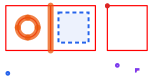
Marks: open ends cut twice dots and tiny bits text and pictures
The checklist Shapes are closed. An outline that does not meet itself cannot cut a piece out. More on open paths .No doubled lines. Anything drawn twice is cut twice. Why lasers cut twice .No stray points or tiny pieces. They leave burn marks. Stray points .Text is turned into outlines. Typed text may not cut or may change font. Text to outlines .No pictures in the cut file. Pictures can only be engraved. SVG only engraves .The size is right. Pixel-sized SVGs and unit-less DXFs import at the wrong size. Wrong size .Not too complex. Tens of thousands of points can freeze the software. Too many nodes . The checker above does all seven at once and fixes most of them in one click. Try it on the example: it has one of every problem.
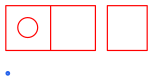
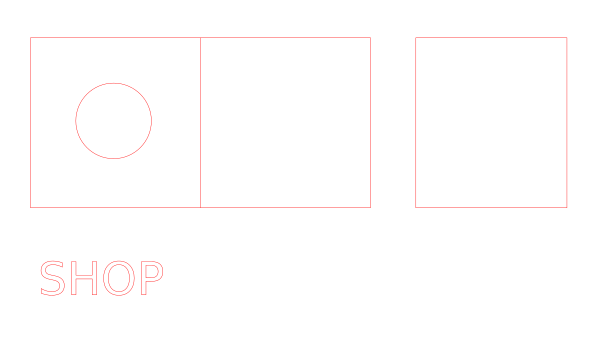
Real example: before and after What the checker found 1 open shape Doubled lines: 1 shape is drawn twice 1 shared edge between touching shapes 1 piece of text is still typed text: "SHOP" 1 picture (bitmap) is inside the file 1 stray dot 1 tiny piece (under 0.5 mm) Size: 142 mm (5.59 in) wide × 68.0 mm (2.68 in) tall What was fixed Removed 1 shape that was drawn twice. Removed 1 shared edge so each edge is cut once. Closed 1 shape whose ends nearly met. Removed 1 tiny piece. Removed 1 stray dot. Took 1 picture out of the cut file. Download: before (SVG) · after (SVG)
Questions Do I really need all of this for every file? Files you draw yourself and have cut before are usually fine. Check every file that came from somewhere else: downloads, Etsy, online converters, CAD exports and traced pictures. The checker does all seven checks in a few seconds.
What about colors and layers? Laser software assigns cut, score and engrave by color, so make sure lines that should cut share one color. The checker keeps your colors as they are.